How to check if you are affected by a KEV-listed CVE
A practical routine for matching CISA's Known Exploited Vulnerabilities catalog to your own servers, apps and images, fixing what matches and proving it.
TL;DR
- Goal: find out, for every CVE that CISA lists as exploited, whether any of your servers, applications, repositories or images contains the affected product and version.
- Key idea: the catalog tells you what attackers are using now; your own inventory tells you whether it is yours. You need both.
- Method: read the new entries each day, match each one to a product and version in your inventory, then apply the vendor update or remove the product.
- Deadline: every entry carries a date added and a due date, which is a good default clock even if you are not a federal agency.
- Proof: after the fix, check again and record that the product is gone or updated, rather than assuming it.
Why it matters
Most published vulnerabilities are never used against anyone. The Known Exploited Vulnerabilities catalog, usually shortened to KEV, is the short list of the ones that are. CISA describes it as the authoritative source of vulnerabilities exploited in the wild and asks organizations to use it as an input when they decide what to fix first. A flaw in the catalog is a flaw someone is already using against someone else, so the usual comfort of a queue sorted by severity score does not apply.
The catalog grows every few days, and its entries are about products, not about your estate. Nobody tells you that an entry applies to the old file transfer tool on a server that nobody owns. The hard part is the match: knowing which of your machines run the named product, and at which version.
Before you start
- An inventory you trust. You need a list of the software on your servers, applications, repositories and container images. If you do not have one, build the first version before reading any catalog entry, because a list of exploited flaws is useless without something to compare it to.
- An owner for each system, so that a match has someone to act on it.
- A change window or an emergency path. The due dates in the catalog are short, often only a few days from the date added.
Step by step
- Read the catalog entries added since your last look. The catalog is also published as a machine-readable JSON file and as a CSV file, so a script or a scheduled job can fetch it instead of a person scrolling the page. For each entry note the vendor and product, the CVE ID, the date added, the due date and whether the entry says it is known to be used in ransomware campaigns.
- Match the vendor and product to your inventory. Look at every layer: operating system packages, runtimes, libraries in repositories and in deployed applications, container images, and any product installed by hand. A product that is not in the operating system's package list can still be on the machine.
- Compare versions. The entry tells you the product; the vendor's advisory, linked in the entry's notes, tells you which versions are affected and which release fixes the flaw. Write down for each machine whether it is affected, not affected or unknown.
- Act by the order CISA gives. Apply the vendor's update. If the vendor has ended support or no update can be applied, take the product off your network. If neither is possible yet, use a documented mitigation or workaround as a temporary measure and record an owner and a date for the real fix.
- For an entry marked as needing forensic triage, assume the product may already have been used against you. Look for signs of compromise on exposed machines before you call the matter closed, and rotate any credentials the product could read.
- Record the result against the entry: which systems matched, what you did and when. This is the evidence an auditor, a customer or your own team will want later.
How to confirm it worked
A fix is only done when a new look at the system agrees. Re-run the inventory on each machine you changed and check that the product is gone or that its version is now the fixed one. Containers and images need their own check, because a rebuilt image is a different artifact from the host that runs it. A package that was updated but still runs the old code, for example before a service restart or a reboot, is not fixed yet.
Keep the daily routine going afterwards. The same match runs again for the next entries, and a system you fixed can regress when an old image is deployed again.
How Stackurity helps
Doing this by hand works for one product and a handful of servers. Stackurity does the matching continuously: it keeps one live inventory of your servers, deployed applications, repositories and container images, and matches it against new advisories and the CISA catalog every hour. The catalog is downloaded in full at least once a day. Each finding is ranked from P1 to P4 with one sentence on why it applies, and a catalog entry raises that priority.
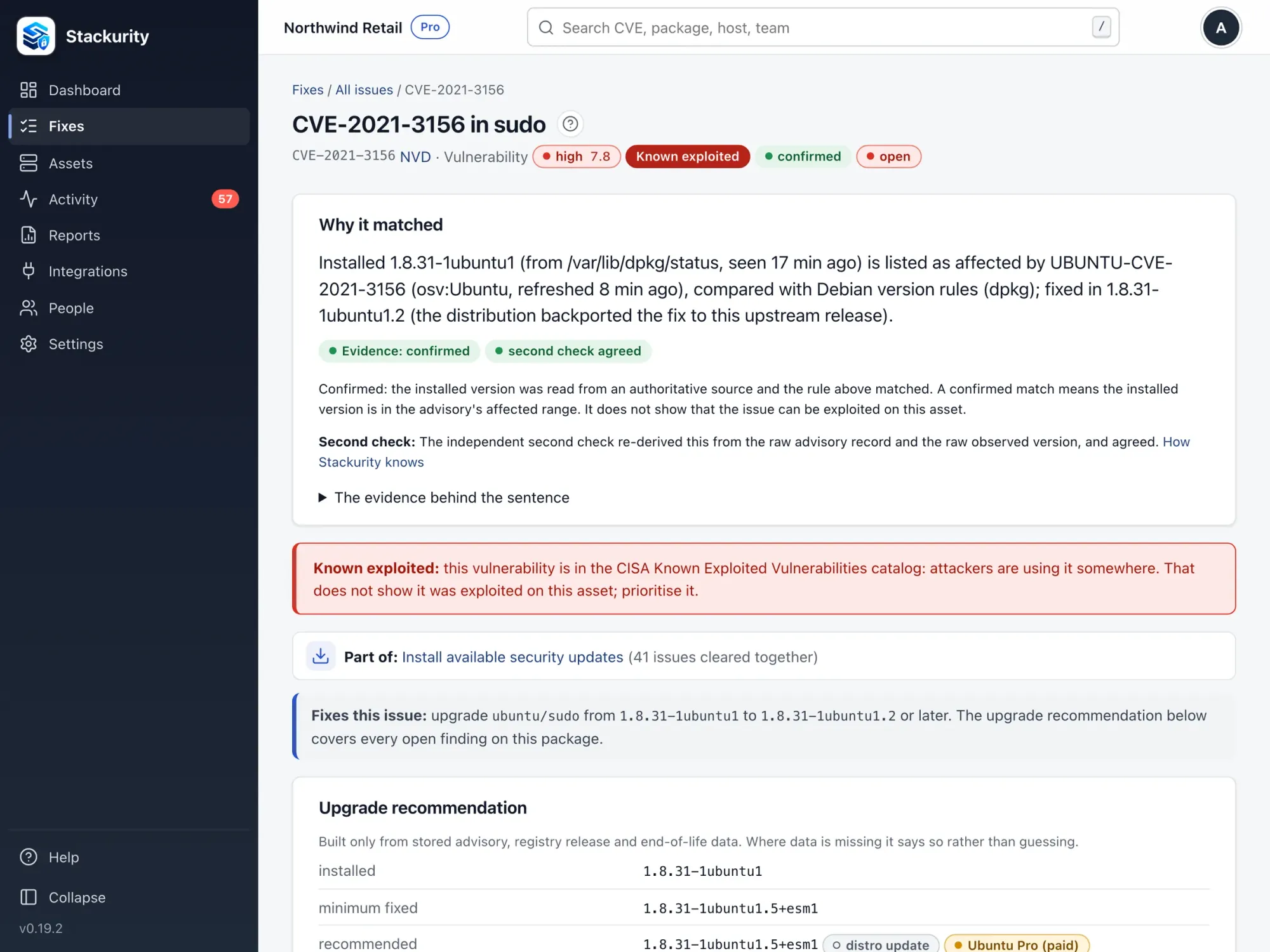
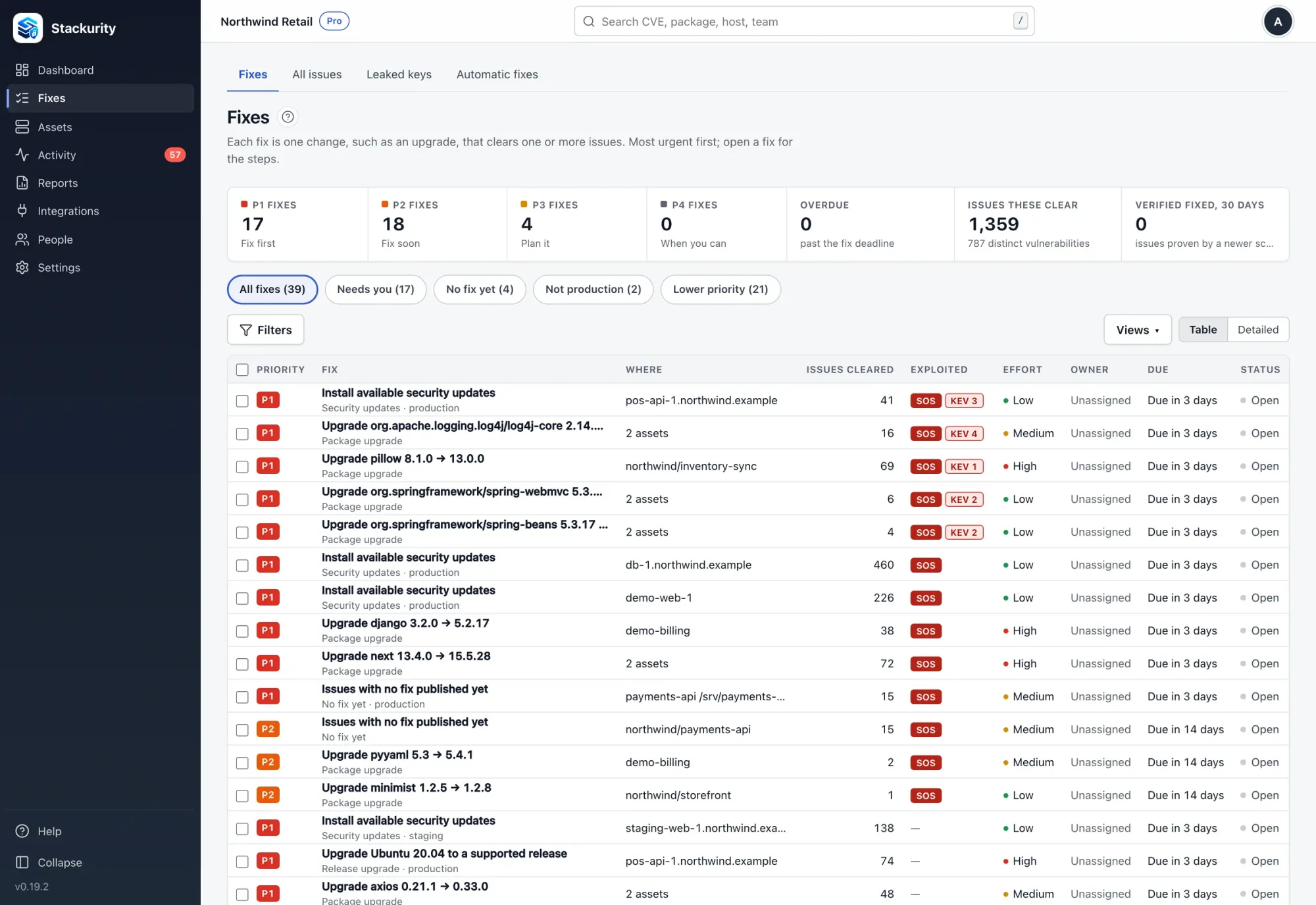
When a vulnerability is a catalog entry, its finding page says so, shows the installed version and the advisory it matched, so you see why the machine is on your list. The upgrades that clear it are grouped into fixes with the version to move to.
After the upgrade, the check again function asks the agent for a fresh report and records whether the issue is passed, partly fixed or still open, which is the confirmation step above. See the remediation guide and the verification guide. Stackurity does not cover network appliance firmware, so catalog entries for firewalls and VPN gateways still need a manual check against the vendor's advisory. For an example of a catalog entry handled this way, read our post on an exploited Collabora flaw. The core is open source under Apache-2.0, and Stackurity Cloud has a 14-day free trial without a card: start a free trial.
FAQ
What does it mean when a CVE is in the KEV catalog?
It means CISA has reliable evidence that the vulnerability has been exploited in the wild, that it has a CVE ID, and that there is a clear remediation action such as a vendor update. It is a stronger signal than a high severity score alone.
Does the KEV catalog apply to companies that are not federal agencies?
The binding deadlines apply to federal civilian agencies. CISA still strongly recommends that every organization, including private companies, prioritize the vulnerabilities in the catalog and treat them as an input to its own vulnerability management plan.
Does a public proof of concept put a CVE in the KEV catalog?
No. Scanning, security research and public proof-of-concept code do not count on their own. The test is evidence that someone actually used malicious code against a system without the owner's permission, including attempts.
What should I do if the product has no update?
CISA's remediation guidance says to apply the vendor's update when there is one, and to take the product off your network if its vendor has ended support or no update can be applied. A workaround or mitigation is better than leaving it as it is, but it is temporary.
How does Stackurity use the KEV catalog?
Stackurity checks the catalog every hour and downloads it in full at least once a day, matches it against your inventory, and ranks each finding from P1 to P4 with one sentence on why it applies. A catalog entry raises the finding's priority.
Sources
Catalog facts: CISA Known Exploited Vulnerabilities Catalog and CISA guidance on reducing the risk of known exploited vulnerabilities. Product facts: Stackurity.