How to harden GitHub Actions: pin actions to a commit SHA
Harden GitHub Actions: pin third-party actions to a commit SHA, limit the token, keep Dependabot updates on and confirm the result.

TL;DR
- The goal: make sure a change in someone else's repository cannot silently change what your build pipeline runs.
- The key setting: refer to each third-party action by its full-length commit SHA instead of a moving tag, and keep the default GITHUB_TOKEN permission at read only.
- Let Dependabot raise pull requests for newer action versions, so pinned does not mean stale.
- To check it worked, review every
usesline in your workflows and confirm none of the third-party ones points at a tag or a branch. - Stackurity does not audit how workflows pin actions, but its CI gate stops a vulnerable dependency from shipping without a stored secret.
Why it matters
A workflow is code that runs with your repository's credentials. Every action it uses is someone else's code, pulled in at run time. GitHub's own documentation warns that one compromised action in a workflow is a serious event: it can read every secret configured on the repository, and it might write to the repository through the GITHUB_TOKEN.
The weak point is the reference. If a workflow says an action is at a tag, then whoever controls that repository can move or delete the tag, and your next run executes whatever it now points to. A commit SHA cannot be moved in the same way. That is why pinning is the first control to apply, and it costs very little.
Pinning on its own is not enough. A pinned action that never gets updated slowly collects known flaws, which is the same problem as any other outdated dependency. We cover the general case in our guide to upgrading a vulnerable npm dependency. This guide therefore pairs pinning with automatic update pull requests, and adds a few related settings that close the most common gaps.
Before you start
- Write access to the repository, because you will change files under
.github/workflows, and permission to add a Dependabot configuration file. - A list of every repository that has workflows. Start with the ones that build and release your software, because they hold the most valuable credentials.
- A branch to try the change on, so a run can fail safely before the change reaches the default branch.
- Someone who knows what each workflow is for. Pinning is mechanical, but deciding which third-party actions you still need is not.
Step by step
- List the actions you use. Open every file under
.github/workflowsand note eachusesline. These lines can appear at the job level and in the steps of a job, which GitHub's documentation describes with the pathsjobs[*].steps[*].usesandjobs.<job_id>.uses. Note which ones belong to GitHub, which to a vendor you already trust, and which to an author you know little about. - Pin each third-party action to a full-length commit SHA. Replace a reference such as
actions/checkout@v6withactions/checkout@<commit>, where the commit is the full-length SHA of the release you reviewed. Take the SHA from the action's own repository and not from a fork, because a fork can contain different code under a similar name. Add a trailing comment with the tag you chose, in the formactions/checkout@<commit> #<tag or link>, so a person can still read which release it is. - Keep untrusted text out of shell scripts. A pull request title or branch name is chosen by someone else. Do not paste it straight into a
runscript. Put the value ofgithub.event.pull_request.titlein an intermediate environment variable underenv:first, and read that variable in the script, so the text is treated as data and never becomes part of the script. - Review changes to workflow files. Add the
.github/workflowsdirectory to yourCODEOWNERSfile, so every proposed change to a workflow needs approval from a named reviewer. This also covers the Dependabot pull requests: someone looks at what changed in an action before the new SHA is merged. - Avoid risky triggers. Do not use
pull_request_targetorworkflow_rununless the workflow truly needs the privileged context, and never check out untrusted pull request code in a workflow that uses them.
Turn on automatic updates for actions. Create a Dependabot configuration file in the .github directory, or open the one you already have, and add the following. Dependabot then checks for newer versions of your actions once a week and raises a pull request for each outdated one, including pinned ones.
version: 2
updates:
- package-ecosystem: "github-actions"
directory: "/"
schedule:
interval: "weekly"
Limit what the token can do. The GITHUB_TOKEN is available to every job. Set its default permission to read only for repository contents, and raise it for a single job only when that job needs more. In a workflow file that looks like this:
permissions:
contents: read
Work through repositories in order of value. A release pipeline pinned today is worth more than twenty test workflows pinned next month.
How to confirm it worked
Open every workflow again and read each uses line. Every third-party action should now point at a full-length commit SHA, with its tag in a comment. A reference to a tag or a branch is the sign that one was missed. Actions that live in your own repository, referred to by a local path such as ./.github/actions/foo.yml, are reviewed as part of your own code and need no SHA.
Then wait for the next scheduled check. A pull request from Dependabot that updates one of your pinned actions to a newer SHA is the proof that the update path works. If none arrives after a week, check that the configuration file sits in the .github directory and that the directory setting points at the root of the repository.
Two GitHub features give a second opinion. CodeQL can scan and detect potentially vulnerable workflows when you enable default setup and make sure GitHub Actions scanning is on. The Scorecards project from OpenSSF runs checks that include token permissions and pinned actions, and reports risky practices through the code scanning view.
If you also publish binaries or container images from a workflow, GitHub can attach a signed statement about where and how they were built, called an artifact attestation. Anyone who downloads the file can then check it with:
gh attestation verify PATH/TO/YOUR/BUILD/ARTIFACT-BINARY -R ORGANIZATION_NAME/REPOSITORY_NAMEHow Stackurity helps
Stackurity does not audit how your workflows pin their actions, so use the steps above and the checks from GitHub for that part. What it adds is protection on the other side of the same pipeline: the code you build.
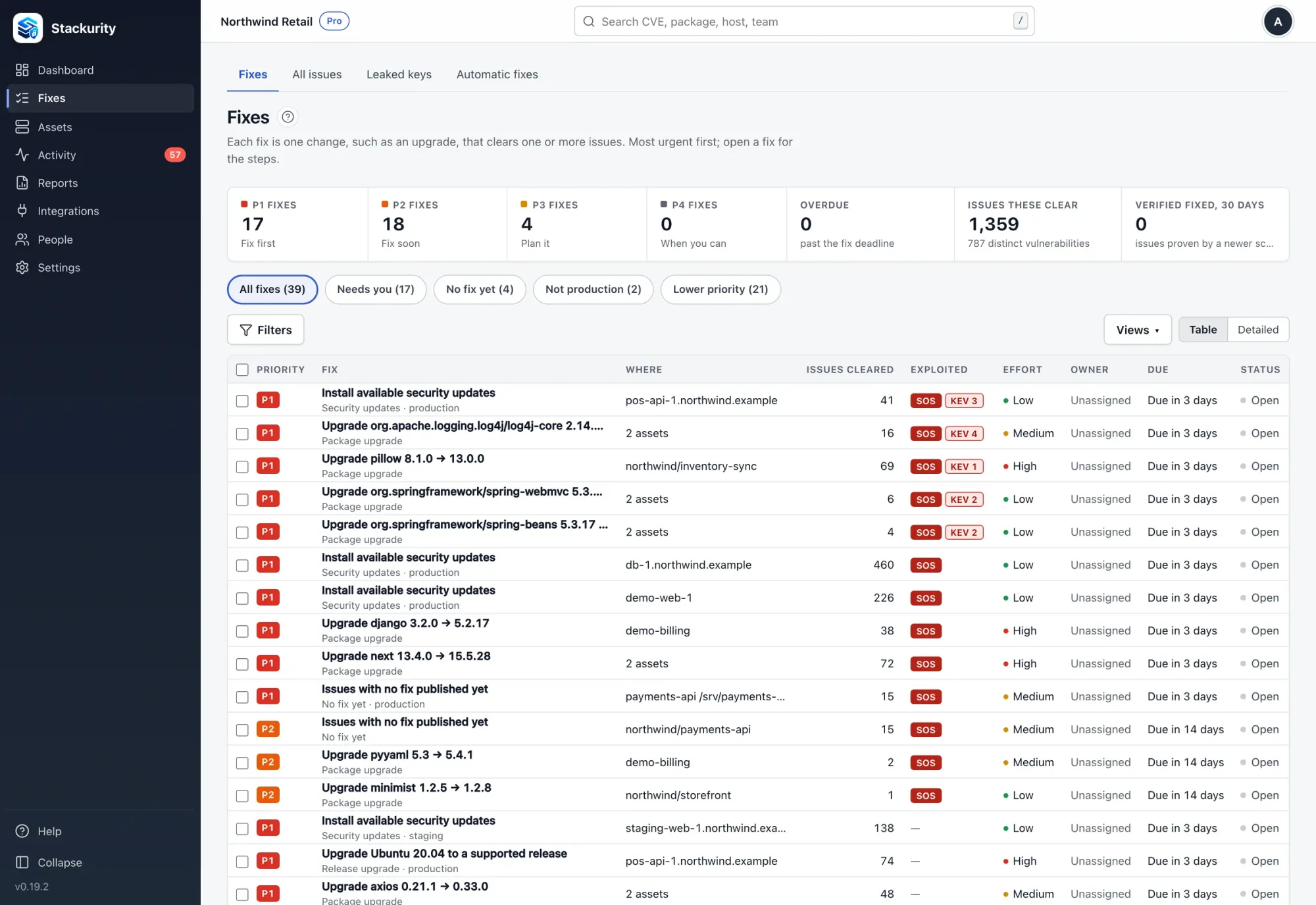
The CI gate stops a vulnerable change before it ships. In GitHub Actions, the scan needs no stored secret: the job's OpenID Connect ID token is exchanged for a 15-minute token that can report only that repository. That fits the aim of this guide, because there is no long-lived credential in the workflow for a compromised action to steal. Everything the scan finds lands in one list of fixes, one per upgrade, with every issue it clears, and you can open the remediation guide to see how those fixes are tracked. After you upgrade, check again asks for a fresh report and records whether the issue is really gone.
Stackurity reads the lockfiles of your repositories and matches them against advisories, so a vulnerable dependency shows up whether it is used by a workflow, a service or a library. The core is open source, and Stackurity Cloud has a 14-day free trial without a card: start a free trial.
FAQ
Why should I pin GitHub Actions to a commit SHA?
Whoever gets control of the action's repository can repoint or remove a tag, so a workflow that refers to one may run different code tomorrow. A full-length commit SHA identifies one exact version of the code, so the workflow keeps running what you reviewed.
Is pinning to a tag ever acceptable?
Only when you trust whoever wrote the action. GitHub treats the verified creator badge on Marketplace as a helpful signal, but some risk remains, because an attacker who breaks into a trusted author's repository can still change a tag.
Will pinned actions stop getting updates?
Not if you enable Dependabot version updates for the github-actions ecosystem. It checks on the schedule you set and opens a pull request when a newer version of an action exists, so you review and merge the new SHA instead of discovering the gap later.
Does Stackurity check how my workflows pin actions?
No. Stackurity does not audit how workflows pin actions. Its CI gate checks the dependencies in your repository and stops a vulnerable change before it ships, using a short-lived token so that no secret has to be stored in the workflow.
Sources
GitHub secure use reference, GitHub guide to Dependabot updates for actions, GitHub guide to artifact attestations, Stackurity product facts.